
SFSTest1.3 - App Store
You'll be able to see results in few seconds.
Publisher Description
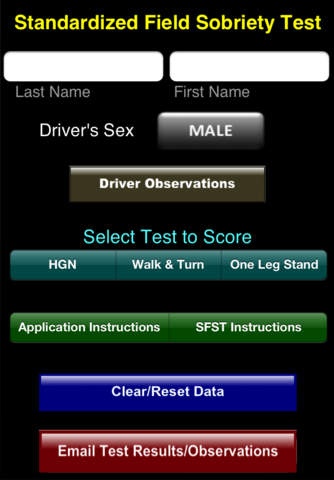
The SFST Application is an application designed to assist Officers with administering the Standardized Field Sobriety Test when stopping a driver suspected of driving under the influence.
The SFST Application has 4 basic views. The first allows the Officer to select driver observations concerning the driver s activities when contact is first made and when they get out of the vehicle. A few of the observations that may be selected are:
-Bloodshot Eyes
-Slurred Speech
-Admitted to Drinking
-Trouble Exiting the Vehicle
The next three views are for the three Standardized Field Sobriety Test tests
-Horizontal Gaze Nystagmus (HGN)
-Walk and Turn Test
-One Leg Stand Test
On the HGN view the Officer selects whether each of the 6 possible clues are present simply by selecting a Yes/No button. Additionally, there is button to identify if Vertical Nystagmus is present, as well as the ability to identify other activity such as the driver s inability to keep his head still, swaying during the test, etc.
On the Walk and Turn Screen there are two sets of footprints representing the nine steps the driver is to take up and then the nine steps they are to take when they return. The set of footprints on the left side of the screen are used to identify those steps where the driver failed to walk heel-to-toe. The set of footprints on the right side of the screen represents those steps where they step off the line. During the test the test the Officer simply selects the step on the screen the driver missed, at which time the selected step will turn red.
Below the footprints are other observations that may be made of the driver during the test such as;
Could not stand heel-to-toe
Started Test to Soon
Took the Wrong Number of Steps, etc.
On the One Leg Stand Test screen there is a button to identify the foot raised and four buttons for each of the four possible clues. When the option for putting their foot down is selected a text box will appear along with a plus button. Each time the plus button is pressed the counter for when they put their foot down is increased by one. As with the other two tests there are additional observations the Officer may make simply by checking the appropriate check box.
After the test and driver observations are completed the Officer selects the option to email the results. The application converts all of the observations made by the Officer into a narrative, placing the narrative into an email message they email to themselves. Upon receiving the email message the Officer simply copies the narrative from the email and pastes it into whatever program they are using to write their DUI report.
In addition to describing the results of the tests, the narrative also includes the instructions the Officer would have given to the driver, conforming to SFST manual.
There is an additional screen that includes the SFST instructions to be given to a driver.
Efforts have been made to make the narrative as detailed as possible while in a format generic enough to comply with the writing styles of theb various police agencies.
Requires iOS 4.3 or later. Compatible with iPhone, iPad, and iPod touch.
About SFSTest
The company that develops SFSTest is Charles Russell. The latest version released by its developer is 1.3.
To install SFSTest on your iOS device, just click the green Continue To App button above to start the installation process. The app is listed on our website since 2011-08-01 and was downloaded 0 times. We have already checked if the download link is safe, however for your own protection we recommend that you scan the downloaded app with your antivirus. Your antivirus may detect the SFSTest as malware if the download link is broken.
How to install SFSTest on your iOS device:
- Click on the Continue To App button on our website. This will redirect you to the App Store.
- Once the SFSTest is shown in the iTunes listing of your iOS device, you can start its download and installation. Tap on the GET button to the right of the app to start downloading it.
- If you are not logged-in the iOS appstore app, you'll be prompted for your your Apple ID and/or password.
- After SFSTest is downloaded, you'll see an INSTALL button to the right. Tap on it to start the actual installation of the iOS app.
- Once installation is finished you can tap on the OPEN button to start it. Its icon will also be added to your device home screen.
Program Details
System requirements
Download information
Pricing
Version History
version 1.3
posted on 2011-08-01
Disclaimer
Official App Store Link
We do not host SFSTest on our servers. We did not scan it for viruses, adware, spyware or other type of malware. This app is hosted by Apple and passed their terms and conditions to be listed there. We recommend caution when installing it.
The App Store link for SFSTest is provided to you by apps112.com without any warranties, representations or guarantees of any kind, so access it at your own risk.
If you have questions regarding this particular app contact the publisher directly. For questions about the functionalities of apps112.com contact us.
